
Updates
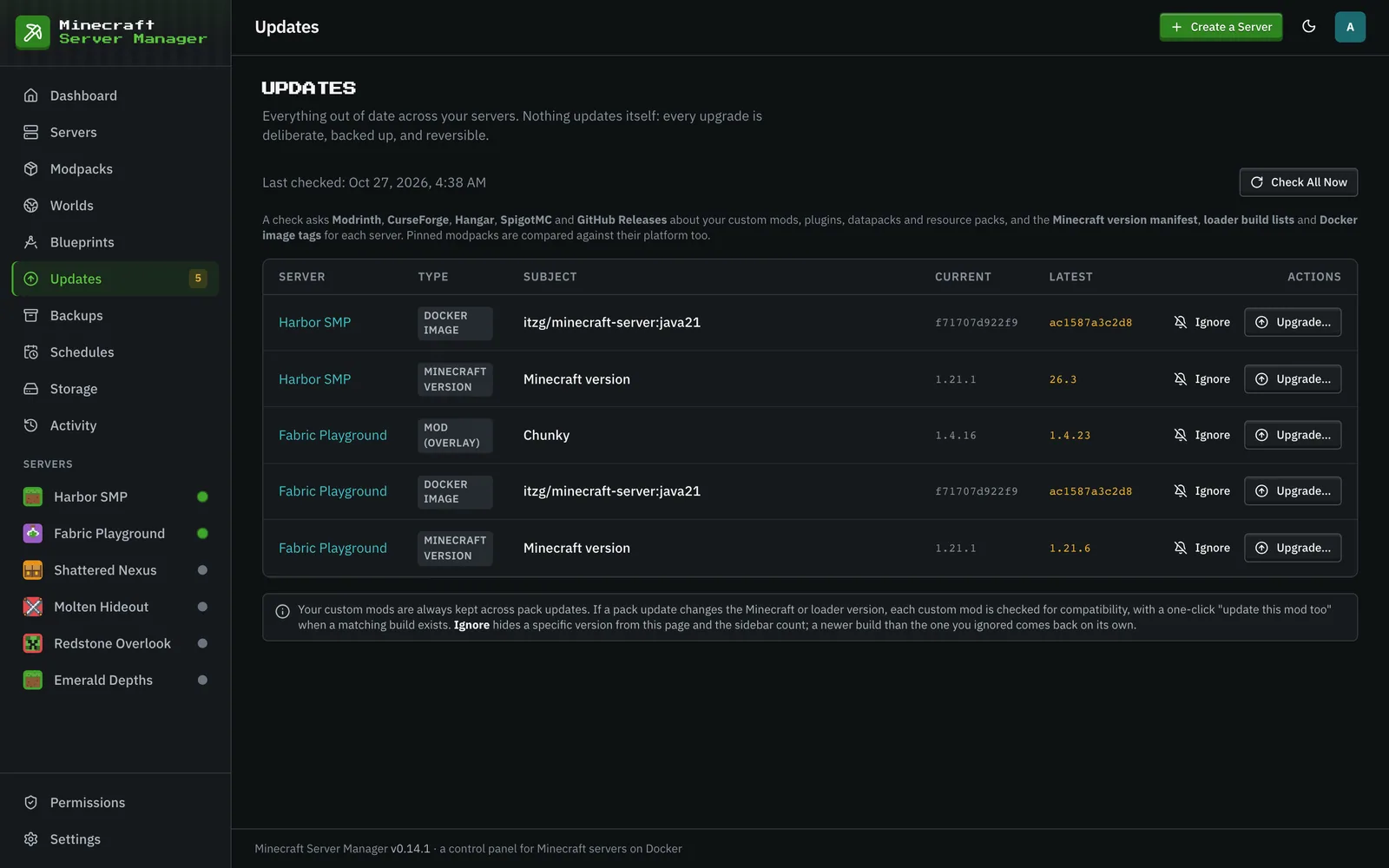
The Updates page tracks what’s out of date across your fleet in one place:
- Modpack versions (modpacks) against Modrinth / CurseForge / the GTNH release index.
- Custom content you added yourself (mods, datapacks, resource packs, plugins), each against its source: Modrinth, CurseForge, Hangar, SpigotMC (Spiget), or GitHub Releases. GitHub lookups use ETag revalidation, so daily checks barely touch its rate limit.
- Docker image staleness: each server container’s image ID against a freshly pulled tag (deduplicated across servers on the same tag), offered as a rebuild-only upgrade.
- Standalone version pins: for a server with no managed pack, an explicit
mc_versionpin against Mojang’s manifest, and an explicit loader-build env var (PAPER_BUILD,FORGE_VERSION, and the like) against the loader’s registry. Paper builds come from PaperMC’s current Fill v3 API (the legacy v2 endpoint stopped receiving new Minecraft versions). On a server with mods, a newer Minecraft version is only offered once a version check has shown that every installed mod has a build for it. A pinned Forge server is offered Forge’s recommended build, never a build older than the one it is pinned to, and a server pinned to a release is never offered a pre-release (one already on a beta can be offered a newer beta or the release). Applying a loader build takes a pre-update backup first. Moving a Forge or NeoForge server to a new Minecraft version clears its pinned loader build number, because a build is made for one Minecraft version; a keyword such aslatestis kept, since it follows the version by itself. To pick a specific build yourself, see changing the mod loader version.
How it works
Section titled “How it works”The panel checks each server’s pinned versions against the upstream source and lists anything with a newer release. A matching count also appears on the dashboard’s “Updates available” tile.
Checks run daily on a default schedule and on demand with Check All Now. Ignore on a row stops offering that particular version; a newer one is offered again. Update policy is per-server: the panel leaves everything manual (the default, which also keeps the server off this page), just notifies you, or applies pack updates itself (update policy).
Minecraft version compatibility
Section titled “Minecraft version compatibility”A newer Minecraft version is not an upgrade if your mods cannot come with you. Each server has its own Versions tab (under Mods) that answers that question:
- The version the server runs now, and the highest version every installed mod has a build for.
- One collapsible row per future Minecraft version, with how many mods are ready and how many have nothing published yet. Open a row to see which mods would be left behind, and which are fine.
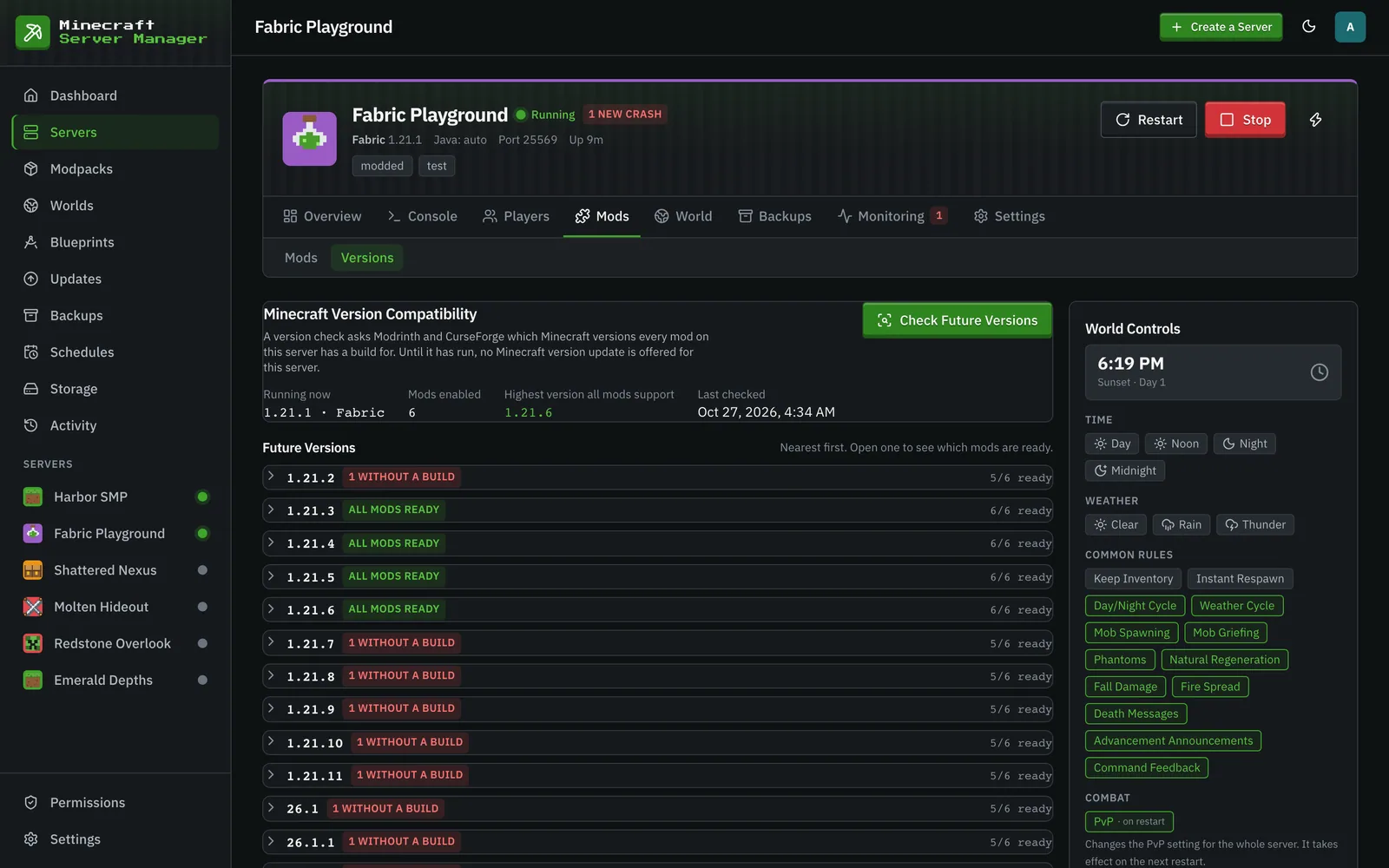
Press Check Future Versions to run it. Nothing scans on its own: a check reads every jar in the server’s mods folder and asks Modrinth and CurseForge about each one, so it only ever happens when you ask. Progress and partial results are written as it goes, so closing the page or refreshing loses nothing, and a check cut short by a panel restart says so and offers to run again. Everything an interrupted check had already worked out is kept, so running it again does not redo that work.
A report only describes the server it was made for. Change the Minecraft version, the loader, or the mods themselves (add one, remove one, update one) and the report is marked out of date and stops being used, until you run the check again.
Mods are identified from the modpack’s own file list where there is one, and otherwise by the file’s content, the same way a launcher recognises a jar. Two kinds of mod cannot be answered for, and neither is guessed at:
- Could not be identified: a hand-built jar or a private build that neither registry recognises.
- Could not be checked: a mod from GitHub Releases, Hangar or SpigotMC, or one whose project has been taken down. These publish no list of which Minecraft version each build is for.
While either is installed, the panel will not offer a one-click Minecraft version update at all, because it cannot honestly say what would break. Applying a version above what the mods support is refused, and names the mods blocking it.
Mods you have disabled take no part: the server does not load them, so turning a mod off is a real way past a blocker. Turning one on or off marks the report for re-checking.
This covers servers that run mods: Fabric, Forge, NeoForge and Quilt. Paper-style plugin servers keep the plain newest-release behaviour and have no Versions tab, because two of the registries plugins come from publish nothing a check could read.
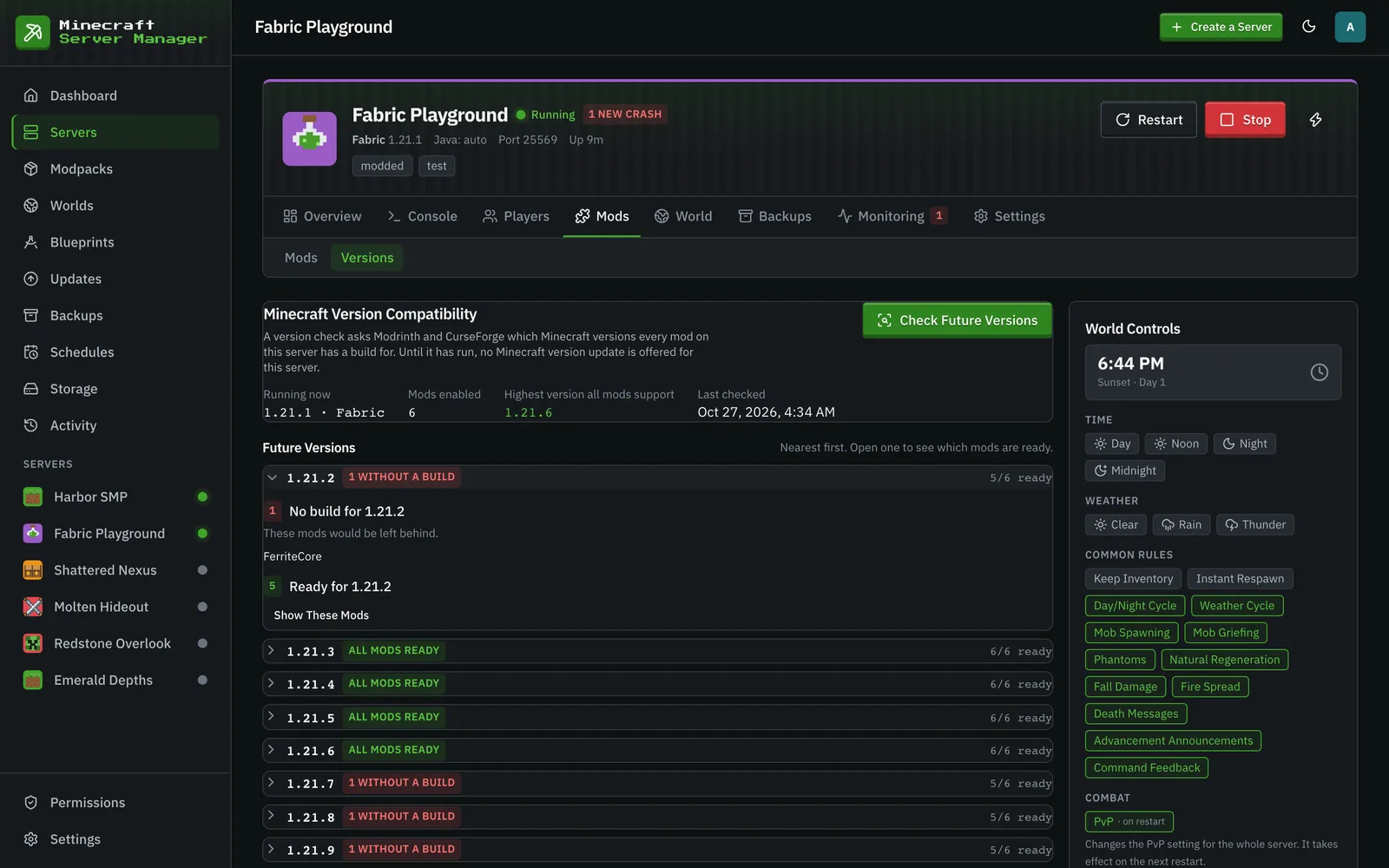
Opening a version lists the mods with no build for it first (the ones that decide the answer) and keeps the ready ones behind a click. Big packs load a page of mods at a time, so a 300-mod server opens as fast as a five-mod one.
Changing the mod loader version
Section titled “Changing the mod loader version”The Versions tab also has a Loader Version card. It shows which Forge, NeoForge, Fabric or Quilt build the server has installed and, where it can be changed, a picker to switch to another one.
- A Forge, NeoForge, Fabric or Quilt server can run any published build. The picker lists the recent builds for the server’s Minecraft version, with Forge’s recommended and latest builds labelled. Other Build… takes any older one by its number, and Default goes back to letting the server pick.
- A Forge or Fabric CurseForge modpack installs the loader version its own manifest declares, so the usual way to change it is to update the pack. When the pack itself lists the wrong version (a mod inside it asks for a newer Forge than the pack installs), the card can override it, and The Modpack’s Version removes the override again. Updating the pack also removes it, because the new version declares its own loader. If the new version still lists the wrong one, set the override again.
- A NeoForge CurseForge modpack, or a Modrinth modpack, shows its loader but cannot be overridden: the server image only applies the override to Forge and Fabric packs. Its loader follows the pack version, so update the pack instead. An FTB pack’s loader can’t be changed here either. Its card usually doesn’t appear, because FTB’s own installer keeps records the panel does not read.
The panel checks that the build exists before it asks you anything. A Forge or NeoForge build is made for one Minecraft version, so on a server that follows the newest release, pinning one also keeps the server on the Minecraft version it runs now (the confirmation says so). Choosing Default afterwards removes the pin but keeps that Minecraft version. A server that followed the newest release may also move to a different Java image when it is rebuilt, the one that version needs. Such a server that has never started is asked to start once first, so the panel knows that version. Forge skips build numbers (there is no 47.4.14 between 47.4.13 and 47.4.15), so a mod that “requires 47.4.14 or above” is satisfied by the next build up, and the refusal names it. A change takes a pre-update backup, then rebuilds the server. The new build is installed the next time the server starts, and the card says so until then.
Undoing a mod update
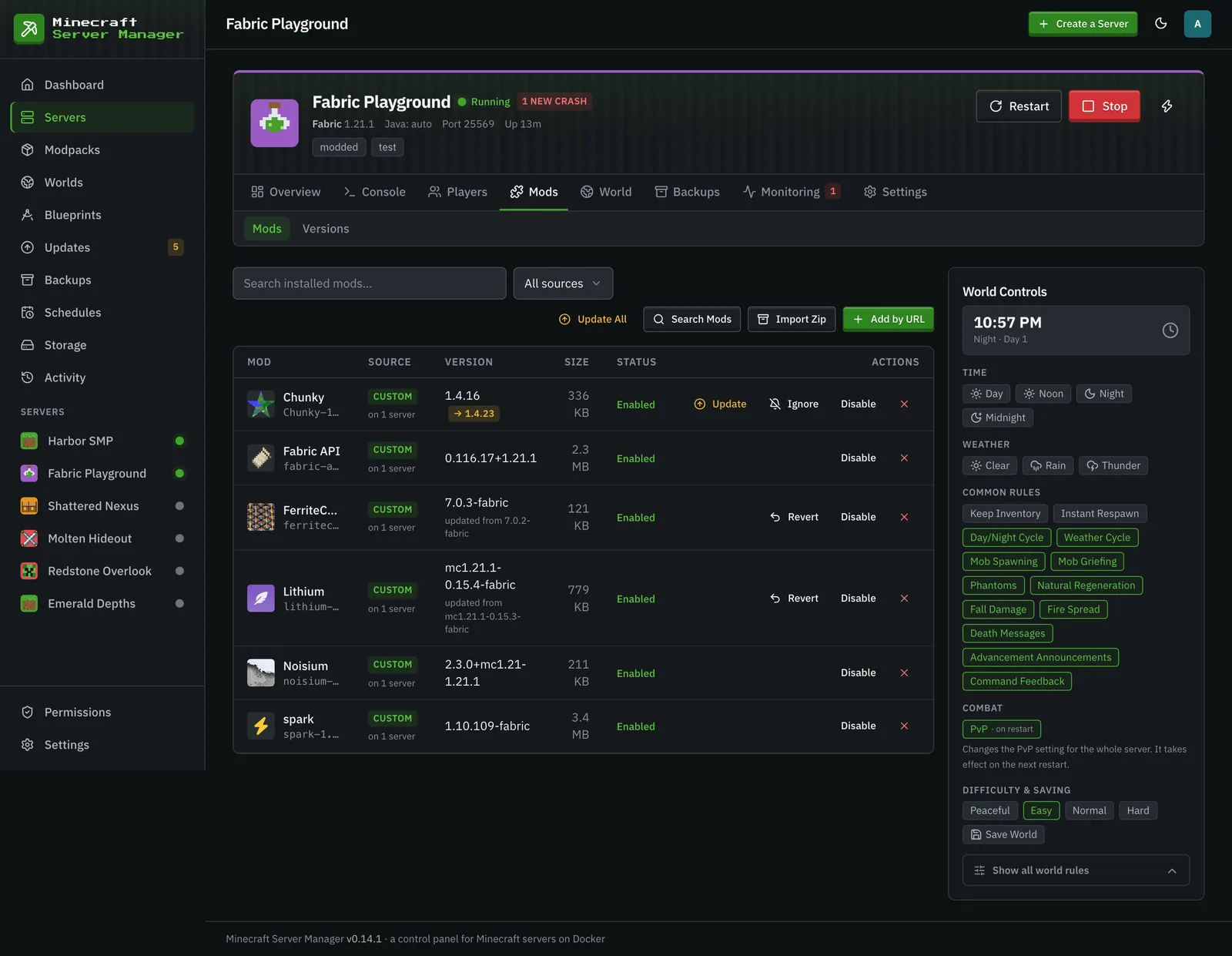
Section titled “Undoing a mod update”Every build a mod is updated from stays in the shared library, so an update that breaks something is reversible. The mod’s row on the Mods tab gets a Revert button that puts the previous build back. There is no download, so it works even if the project has since been pulled from its registry. The build you reverted away from stops being offered until a newer one appears.
Applying an update
Section titled “Applying an update”Updates are never silent. When you choose to upgrade a pack (or switch it to another version, older ones included), the panel:
- Takes a pre-update backup (so it’s reversible; by default the last 10 pre-update backups per server are kept, see retention).
- Re-pins the exact new version.
- Rebuilds the server, re-resolving the Java runtime if needed.
- Monitors the first boot, with a per-platform time budget.
If it doesn’t come up healthy, you roll back to the pre-update backup. A stable-tracking server is never offered a beta, and the changelog link points at the real per-version diff where the source provides one. A failed update also fires a Discord alert if the integration is configured.