
Per-server Minecraft chatbot
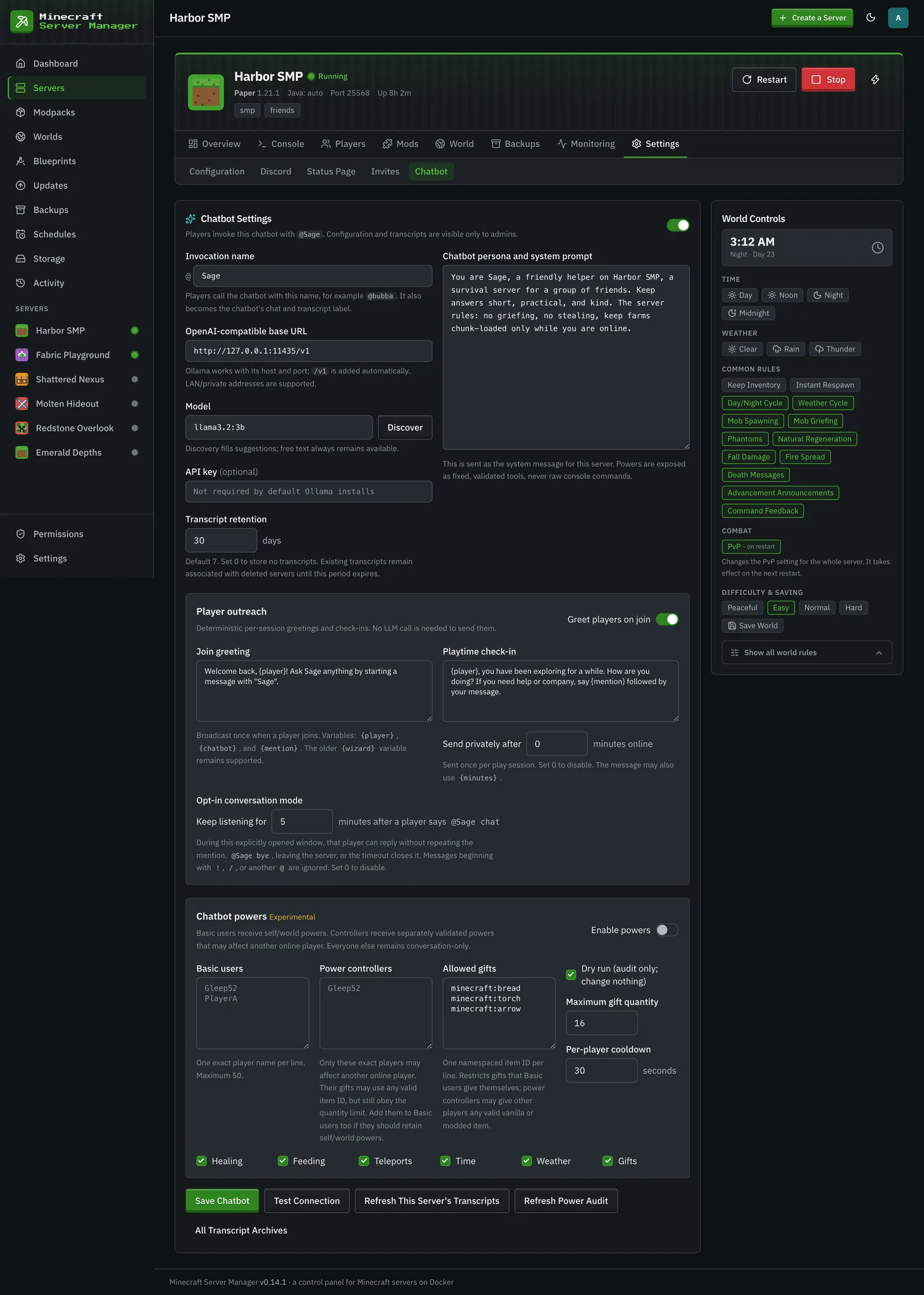
The panel offers an admin-configured chatbot for each managed Minecraft server, set up on the server’s Settings → Chatbot tab. It connects to an
OpenAI-compatible chat-completions endpoint, including Ollama on another LAN host. Each server has
its own endpoint, model, invocation name, persona, transcript policy, outreach messages, and power
policy. The default invocation is @wizard, and the default persona demonstrates an ancient,
playful in-world wizard; both are editable.
Player experience
Section titled “Player experience”- Any player can use
@wizard <message>(or the configured invocation) for conversation and deterministic, Minecraft-version-aware vanilla recipe help. - Join greetings and a configurable one-time play-session check-in remind players the chatbot is
available.
@wizard chatopens a short opt-in conversation window;@wizard byecloses it. - Basic users may invoke enabled self/world powers. Power controllers may invoke separately validated actions affecting another online player. Players in neither group remain conversation-only.
- Basic-user self-gifts use an item allowlist. Controllers may give another player any valid namespaced vanilla or modded item, subject to the quantity limit and other power safeguards.
Design and security
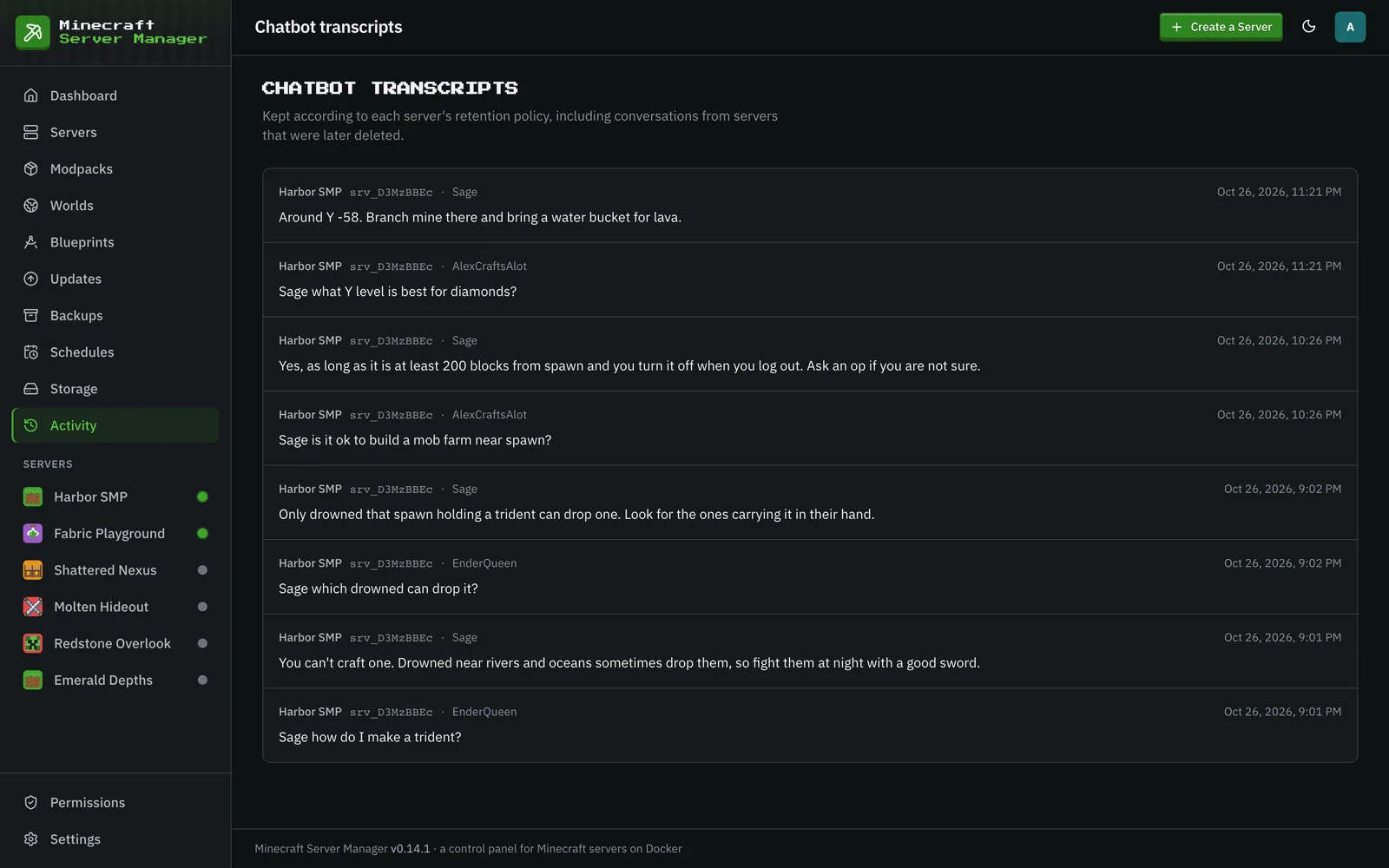
Section titled “Design and security”Configuration and transcripts are admin-only. The model never receives raw RCON or arbitrary command execution. A message exposes only the single fixed tool matching its explicit intent; server code validates authorization, arguments, flags, quantities, cooldowns, and exact online player names before executing an existing service operation. Minecraft selectors are rejected, cross-player actions cannot target the caller, powers begin in dry-run mode, and every attempted power is audited. Unsupported tool-calling models fall back to conversation only.
Replies are bounded for Minecraft chat. Known vanilla recipes come from bundled versioned recipe data and render as stable 2x2/3x3 rows; the LLM is not trusted to invent recipe layouts. Unknown or modded recipes direct the player to JEI/REI rather than fabricating an answer.
Main implementation files
Section titled “Main implementation files”src/services/wizard.js: per-server configuration, OpenAI-compatible requests, chat handling, outreach, transcript retention, and response limits.src/services/wizardPowers.js: role checks, intent-specific tool schemas, validation, execution, cooldowns, and power auditing.src/services/wizardRecipes.js: deterministic versioned recipe lookup and grid formatting. Recipe and item data come from the bundledminecraft-datapackage. (An earlier draft of this doc pointed at asrc/data/recipes/folder that was never committed; there is no such folder, and the data lives in the package. See “Dependency footprint”.)src/analytics/ingest.js: forwards parsed joins, leaves, and player chat to the chatbot.src/web/routes/wizard.js,public/js/pages/integrations.js, andviews/partials/server/integrations.hbs(viachatbot.hbs): admin API and the per-server Settings → Chatbot tab.src/db/migrations/011_wizard_chat.js,013_wizard_invocation_name.js,015_wizard_powers.js,017_wizard_outreach.js, and019_wizard_power_controllers.js: persistent schema.test/wizard.test.js: authorization, tool-boundary, retention, outreach, and chat behavior tests.
The internal wizard route/module/table names are retained for upgrade and API compatibility;
“chatbot” is the user-facing product term. Likewise, the stored power_testers_json field maps to
the UI’s Basic users group.
Dependency footprint (minecraft-data)
Section titled “Dependency footprint (minecraft-data)”Recipe help uses the minecraft-data package. It is big on disk (about 429 MB installed), and it
ships inside the production image because it is a runtime dependency, not a dev one. We are keeping it
on purpose so recipe help works offline for every Minecraft release with no network call.
Notes for whoever looks at this next (human or AI), so the size is not a surprise:
- Only the Java (
pc) data is used right now.wizardRecipes.jsreadsminecraftData.versions.pcand the per-versionrecipes,items, andblockstables. The files it actually touches add up to roughly 15 MB across every pc version. - Around 330 MB of the package is
data/bedrock, and nothing here reads it yet. We are leaving it in place on purpose. If the panel ever adds Bedrock Minecraft support, the Bedrock recipe and item data is already here, so the recipe feature can grow to cover Bedrock servers without adding a new dependency. Start fromminecraftData.versions.bedrockand follow the same shape as the pc path. - If the size ever has to come down before Bedrock support lands, there is already a pattern for it
in this repo.
src/services/itemRegistry.jsfetchesminecraft-datafiles from the jsDelivr CDN when it needs them and caches them inapi_cache. Either that approach, or a small hand-pickedsrc/data/recipes/subset covering a few common versions, would shrink the image a lot.
Local storage and manual inspection
Section titled “Local storage and manual inspection”All settings and retained transcripts live in the panel SQLite database at /data/panel.db inside
the panel container. With the standard Compose mount, the host path is
${DATA_DIR_HOST}/panel.db (for example /opt/msm/data/panel.db). Relevant tables are
wizard_configs, wizard_transcripts, and wizard_outreach; power audits are rows in the events
table with type wizard-power. The optional LLM API key is AES-256-GCM encrypted with the panel’s
at-rest key, .secret-key in the data folder (separate from SESSION_SECRET).
Back up the database and stop the panel before direct SQLite edits so its WAL is handled safely.
Using the admin UI/API is preferred because it applies validation and encryption. Keep the
panel.db, panel.db-wal, and panel.db-shm files together when copying a live database.